Starbucks Partner Central Logins, Rules, Benefits & Complete Access Guide (2026).
Walking into your first shift at Starbucks is more than just learning how to pull a perfect shot of espresso or mastering the sequencing of a busy morning peak. It is about stepping into a massive, global ecosystem that refers to its employees as “partners”—a term meant to signal shared effort and shared success.
To manage this workforce of over 361,000 people, Starbucks utilizes a sophisticated digital command center known as Starbucks Partner Central.
Whether you are a new hire trying to find your first schedule or a seasoned shift supervisor looking to maximize your “Bean Stock,” understanding Partner Central is the key to unlocking your career potential. This guide will walk you through everything from the initial login to the life-changing benefits that come with wearing the green apron.
What is Starbucks Partner Central?.
Starbucks Partner Central is the primary administrative portal for every Starbucks employee. Think of it as the “brain” of your employment. While you might use other apps for specific tasks, Partner Central is the central hub where your official records live.
In real-world usage, you’ll head here to check your pay statements, update your tax information, manage your benefits, and ensure your personal contact details are correct. It’s the digital foundation that connects your work behind the counter to the corporate support system.
Who Can Use Starbucks Partner Central?.
Access is granted to all active Starbucks partners, including:
- Retail Staff: Baristas and Shift Supervisors.
- Management: Assistant Store Managers and Store Managers.
- Corporate Staff: Partners working in regional offices or the Seattle headquarters.
During your onboarding, you are assigned a unique Global Username (often your partner number preceded by “US” or “CA”). This credential is your key to the portal. New hires must activate their accounts through Partner Central before they can access scheduling tools or other job-related functions.
How to Access Starbucks Partner Central?.
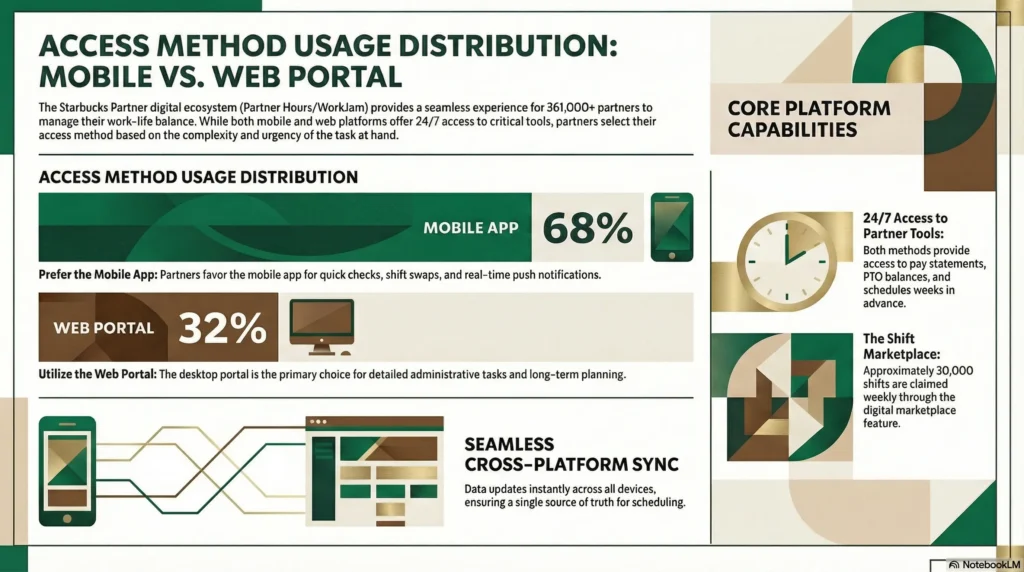
You can access Partner Central through two main methods:
- The Web Portal: This is the most reliable method for detailed tasks. It is accessible via any modern browser at partnercentral.starbucks.com. This version is ideal for desktop browsing or when using Chrome OS devices in the back-of-house (BOH).
- The Mobile Application: Most partners use the WorkJam app (which has replaced older versions) to access their information on the go.
Device Limitations: While you can check your schedule and pay stubs on personal devices, official “clocking in” and “clocking out” must be done on store-provided devices to ensure accuracy and security.
How to Log In to Starbucks Partner Central? (Step-by-Step)?
Logging in is a two-stage process designed to keep your data secure.
- The Initial Prompt: On the login screen (especially within the app), you will be asked for your email. Enter your Global Username followed by @starbucks.com (e.g., US12345678@starbucks.com).
- The Single Sign-On (SSO) Page: You will then be redirected to the official Starbucks login page. Here, enter just your Global Username and your Password.
Global UserName
To access and use your Starbucks Global Username, there are several primary links and digital platforms identified in the provided sources:
Primary Login Portal: The main entry point for authentication using your Global Username is id.starbucks.com.
Partner Central (Account Management): For self-service tasks, such as resetting your password or managing your partner profile, you should use partnercentral.starbucks.com.
Scheduling Web Portal: If you are accessing the scheduling platform (Partner Hours) via a web browser rather than the mobile app, the direct link is starbucks-wfmr.jdadelivers.com/retail/portal.
Alternative SSO Link: An additional link frequently used for single sign-on (SSO) to access the Partner Hub and other benefits is sso-group0-iad.starbucks.com.
Troubleshooting Login Errors:
- “Invalid Role”: This usually means your account isn’t fully linked to a store yet.
- “Session Expired”: This is a common glitch; try clearing your browser cache or restarting the app.
- App Glitches: If the app freezes, ensure you are running the latest version from the app store.
How to Reset Your Password?
Passwords for the Starbucks ecosystem expire periodically for security. If you are locked out, you must reset it at the source.
- Step 1: Visit partnercentral.starbucks.com on a web browser.
- Click on the “Forgot Password” or “Reset Password” link.
- Follow the prompts sent to your recovery email to create a new password.
- Note: Once you update your password here, it will automatically update for the WorkJam app and the scheduling portal.
Installation Guide on iOS and Android.
You won’t find a “Partner Central” app in the public app store. Instead, Starbucks uses a secure container system.
For iOS (iPhone/iPad).
- Download “Intelligent Hub”: Find the Workspace ONE Intelligent Hub in the App Store.
- Scan QR Code: Ask your Store Manager for the official “Quick Reference Guide” QR code.
- Authenticate: Enter your Global Username (@starbucks.com) and enroll your device.
- Install WorkJam: Once enrolled, the Hub will prompt you to install the official partner apps.
For Android:
- Download “Intelligent Hub”: Find Workspace ONE in the Google Play Store.
- Secure Work Profile: Android will create a separate “Work Profile” to keep your personal photos and messages private from work data.
- Scan & Sign In: Use the store’s QR code to enroll and sign in with your partner credentials.
Pro Tip: To make it feel like a regular app, use the “Add to Home Screen” feature in Safari or Chrome for the web portal version.
Is Partner Central Available on Mobile?
Yes, but with a distinction. The Starbucks Partner App (via WorkJam) is the mobile-optimized version for daily tasks. The full Partner Central website is also mobile-friendly and is better for “heavy lifting” like viewing complex benefits documents or historical pay stubs.

Can I Check My Schedule on Partner Central?.
While you can view your schedule on the main Partner Central portal, most partners prefer the dedicated Partner Hours section or the WorkJam app.
- Partner Central: Best for looking at the “big picture” and payroll totals.
- Partner Hours/WorkJam: Best for the “Shift Marketplace,” where you can swap shifts or offer yours to others.
- Visibility: Schedules typically post two weeks in advance.
Detailed Features of Starbucks Partner Central.
Partner Central isn’t just a login page; it is a full-service dashboard.
- Payroll & Pay Stubs: View your hourly rate, tax withholdings, and year-to-date earnings.
- Benefits Management: This is where you sign up for health insurance or check your eligibility for the 401(k) “Future Roast” plan.
- Personal Profile: Update your legal name, address, and emergency contacts.
- Stay updated on the latest “Origin Experiences” or new seasonal drink launches.
Benefits of Starbucks Partner Central.
The portal is your gateway to a “Total Partner” compensation package that averages a value of $30 an hour (when including the value of benefits).
- Transparency: You can see exactly how many hours you’ve worked and how they translate into your paycheck.
- Convenience: No more calling the store to ask when you work; the info is in your pocket 24/7.
- Career Growth: Access training programs like the “Barista First 30” to prepare for leadership roles.
- Financial Wellness: Sign up for the Siren Card, which helps partners increase their credit scores by an average of 90 points.
Partner Central vs. Starbucks Partner Hours.
It is common to confuse these two, but they serve different roles.
| Feature | Starbucks Partner Central | Starbucks Partner Hours |
| Primary Purpose | Administrative & HR Hub | Scheduling & Labor Management |
| Top Tasks | Pay stubs, Taxes, Benefits | Viewing shifts, Swapping hours |
| Accessibility | Web browser & App | WorkJam App & Web Portal |
| Usage Focus | Long-term (Career & Finance) | Daily/Weekly (Shift Logistics) |
Common Rules & “The 12-Hour Rule”.
To keep the system running smoothly, there are several key rules every partner should know:
- The 12-Hour Rule: To remain eligible for benefits and maintain employment, partners generally must work an average of 12 hours per week over a rolling 13-week period.
- The 4-Minute Rule: A service goal focused on speed and connection; we aim to deliver drinks in 4 minutes or less during peak times.
- Shift Trading: You can swap shifts, but it requires manager approval to ensure the floor is properly staffed with the right “aces in their places”
Common Issues & Troubleshooting.
- Missing Schedule: If your calendar is blank, your store assignment might need a 24-hour refresh in the database. Ask your manager to verify your location.
- Browser Issues: The web portal works best on modern browsers like Chrome. If using a BOH computer, avoid older versions of Internet Explorer which may have security certificate issues.
- Notification Failures: Ensure you have enabled notifications both in the app and in your phone’s global settings to get alerts about new schedules.
Pro Tips for Efficiency.
- Bookmark the Portal: Keep
sbux.co/starbuckspartnerhoursorpartnercentral.starbucks.comin your favorites for quick access - Weekly Check: Check your schedule at least three days before the new week starts.
- Notification Hygiene: Turn on “Critical Alerts” so you don’t miss a sudden shift cancellation or an urgent coverage request from your manager.
Starbucks Partner Central is more than just an HR tool; it is a reflection of the company’s 50-year promise to put its people first. From the groundbreaking 1988 decision to offer health benefits to part-timers to the modern Starbucks College Achievement Plan (ASU) that has helped 14,000 partners graduate debt-free, this portal is where those opportunities become a reality.
By mastering your login and staying on top of your “12-hour average,” you aren’t just managing a job—you’re managing a career that offers equity, education, and financial security