Starbucks Information Hub 2026
How to find your Starbucks global user name?
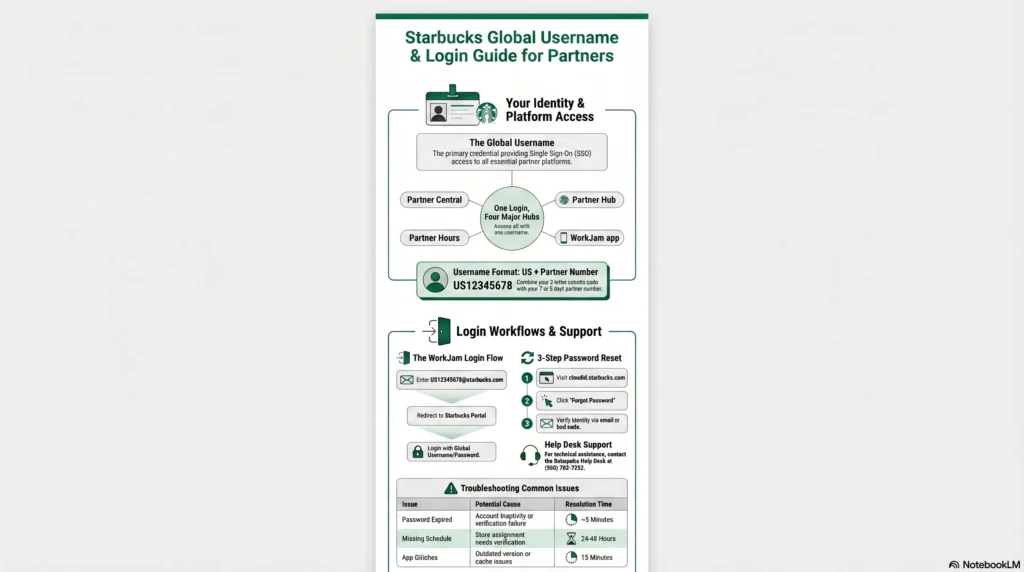
A Global Username is the primary credential granted to Starbucks employees (partners) during their onboarding process to provide secure access to the company’s digital ecosystem. It functions as part of a single sign-on (SSO) system, meaning one username and password are used to access multiple platforms, including Partner Central, Partner Hours (scheduling), and the Partner Hub.
The Global Username.
- Format: It typically consists of your two-letter country code followed by your 7 or 8-digit partner number (for example, US12345678).
- App Logins: When logging into the WorkJam app for scheduling, the system may first ask for an email address. In this field, you should enter your Global Username followed by “@starbucks.com” (e.g., US12345678@starbucks.com). Once redirected to the official Starbucks login page, you use only the Global Username and your password.
- Obtaining It: New partners receive their credentials from their Store Manager after completing the initial onboarding and registration process.
The Password.
- Setup: You create your initial password during your first 15 days of training, often using a store computer via the Password Self-Service tool.
- Security: Partners are responsible for keeping this password secure and are advised never to share it with other employees.
- Expiration: Passwords may expire or stop working if your account remains inactive for a long period or if there is a verification failure.
How to Reset Your Credentials.
If you forget your password or are locked out, you can reset it through the following official channels:
- Online Portals: Visit cloudid.starbucks.com or partnercentral.starbucks.com and select the “I Forgot My Password” link.
- Verification: You will typically need to enter your username or registered email address to receive a verification link or security code via email or text.
- Technical Support: If you cannot reset it online, you can contact the Enterprise Help Desk at (800) 782-7282 for assistance.
What is ADP Portal.
The ADP portal (and similar systems from providers like Convergys) refers to the external third-party platform Starbucks utilizes to manage global human resources business process services and payroll.
While current partners primarily use internal tools like Partner Central and the Partner Hub for daily tasks, the ADP/external portal serves several critical technical functions:
- Payroll and Tax Document Management: The portal is the foundational system for generating and storing pay stubs and W-2 forms. It tracks hours worked, hourly rates, taxes, and deductions for benefits or retirement contributions.
- Access for Former Partners : When a partner leaves Starbucks (“hangs up the apron”), their access to internal systems like the Partner Hub or the Partner Hours app is typically revoked.
- The external payroll portal (often referred to in the context of ADP) remains the primary way for these former employees to securely retrieve their tax documents and final pay statements without needing an active Starbucks network ID.
- Historical Outsourcing : The sources indicate that Starbucks has a long history of outsourcing these high-volume data tasks to improve the company’s ability to handle human resources data and manage payroll efficiently. While the specific vendor may vary by region or year (e.g., Convergys was utilized for global services starting in 2007), these portals function as a secure bridge between Starbucks’ internal records and the partner’s personal financial records.
- Integration with Partner Central : For current partners, the features of this portal are often “seamlessly integrated” into Partner Central (
partnercentral.starbucks.com). Partners can navigate to the “My Pay” or “Tax Forms” section to be redirected to the underlying payroll infrastructure to download secure PDF copies of their documents.
Summary Table: ADP/External Portal vs. Internal Hubs.
| Feature | ADP / External Payroll Portal | Starbucks Partner Hub / Central |
| Primary User | Current and Former Partners | Current Partners only |
| Main Function | Secure tax (W-2) and pay records | Daily operations, benefits, and news |
| Authentication | Often requires separate or legacy login | Global Username and Password |
| Source of Data | Third-party payroll processor | Internal Starbucks HRIS |
What is my Starbucks partner ID?
Your Starbucks partner ID, also known as your global partner number, is a unique identification number assigned to you when you are hired.
How to Find Your Partner ID?
If you do not know your partner ID, the official requirement is to ask your manager to provide it to you. It is an essential piece of information needed to access all partner-specific resources and benefits.
What It Is Used For
- Logging In: Your partner ID serves as your unique username for logging into essential company platforms, including Partner Central, the Starbucks Partner Hours app, and the Partner Hub.
- Accessing Benefits: You must have this number to verify your employment and qualify for partner discounts and facilities.
- Verification Codes: In some instances, such as signing official documents (like a DocuSign for partner separation), your partner number may be used as the access code.
Partner ID vs. Partner Card
It is important to distinguish your partner ID from your Partner Card information. While your partner ID is your employee number used for logging in, the Partner Card has a separate 16-digit card number and an 8-digit PIN. You retrieve those specific card details from your profile in Partner Central to link your employee discount to the Starbucks customer app.